Dreamina AI: Image&Video Maker
- 3.0
- Rating
- 5.00M
- Installs
- Free
- Price

 Analysis by App-foxy
I spent time with Dreamina AI: Image&Video Maker as an art and design app, and my first impression was that it is trying to replace several small creative tools with one AI workspace. It is aimed at people who want to turn an idea into an image, short video, visual concept, or photo effect without opening a traditional editor first. That makes it interesting for quick experiments, although the experience is not equally convincing for every type of creator.
The app comes from Bytedance Pte. Ltd. and is free to install, with optional in-app purchases listed from $10 to $900 per item. That pricing range makes it important to treat the free entry point as a way to explore the workflow rather than assume every useful generation will remain cost-free. I would approach it as a flexible creative assistant, not as a replacement for professional design software.
How Dreamina AI feels in everyday use
The most useful way to understand this app is to imagine a normal, slightly rushed creative task. Perhaps I need a portrait-style visual for a social post, a background for a presentation, or a rough concept for a small project. Instead of searching through stock libraries and then adjusting several layers, I can begin with a written idea and see what the AI produces. That reduction in setup time is the app’s strongest appeal.
You May Also Like

 Pandora - Music & Podcasts
Pandora’s Music Is Easy to Start, but Harder to Recover
Pandora’s strength is its low-effort path from a seed to a station. Its weak spot is how much confidence it asks you to place in connection, setup, and quiet recovery.

 8 Ball Pool
 Is Built on Rivalries, Rematches, and Routine
A close look at the rivalries, rematches, shared routines, and unanswered safety questions that turn a quick pool match into a persistent mobile community.

 Samsung Music
’s Quiet Strength Is Playing What You Already Own
Its reach comes less from spectacle than from dependable access to a personal library. That simplicity is both the app’s strongest retention engine and its ceiling.

 AccuWeather: Weather Radar
AccuWeather Review: A Quick, Clear Forecast for Everyday Decisions
For everyday plans, the best forecast is the one you can understand quickly. AccuWeather makes rain timing, radar, and local conditions easy to act on, with a few trade-offs.

 Hill Climb Racing
Why Hill Climb Racing Still Turns Crashes Into One More Run
A tiny car, a bumpy hill and one more upgrade: Hill Climb Racing keeps resurfacing because its simple chaos makes every near-miss feel personal.

 AliExpress - Shopping App
AliExpress Makes Global Shopping Feel Personal, but Shoppers Bear the Risk
AliExpress turns a global marketplace into a pocket-sized discovery engine. Its reach is useful, its shopping loop compelling, and its trade-offs easy to miss.
More From Our News Desk
View All News


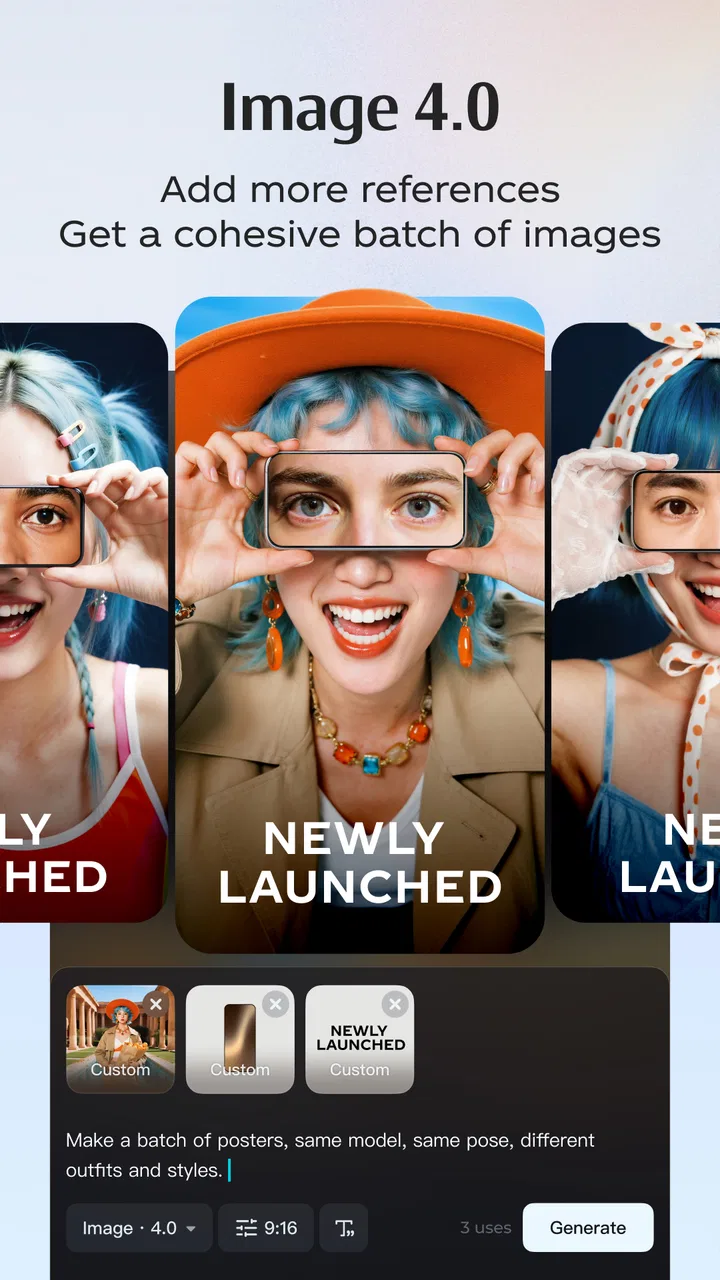
Its focus covers images, videos, designs, and AI-assisted photo effects, so I found the broad scope more important than any single tool. A person who enjoys trying different visual directions can move from a still concept to a more animated idea without changing apps. The trade-off is that a broad studio can feel less specialized than a dedicated photo editor, drawing app, or video editor.
I also think the app suits casual creators better than people who already have a precise production system. If you know exactly how you want to control layers, masks, typography, color profiles, or frame timing, a conventional tool may give you more dependable control. Dreamina is more appealing when the starting point is an idea rather than a finished plan.
The current release is version 2.1.2, and it runs on devices using Android 5.0 or later. That relatively broad system support may make it accessible to people with older phones, but AI creation can still feel more comfortable on a newer device with a good screen and reliable connection. I would not judge the experience only by compatibility; the practical quality of generation and the time spent reviewing results matter just as much.
What works well for quick visual experiments
My favorite part of this kind of workflow is the ability to explore several interpretations of one idea. Instead of polishing the first result immediately, I can compare different moods, compositions, and visual directions. That is especially useful when I am preparing a concept and do not yet know whether a clean, cinematic, playful, or editorial look will fit.
A useful habit is to write prompts in stages. I would first describe the subject and purpose, then add the setting, mood, and intended format. Only after seeing the first result would I refine details. This avoids wasting time trying to describe every tiny element before understanding how the app interprets the main idea. It also makes the process easier to repeat when I want a related image or variation.
The photo-effect side is valuable for users who want a visible transformation without learning a full editing workflow. It can be a convenient way to test a different presentation of an existing photo, especially when the goal is experimentation rather than exact retouching. I would still keep the original image untouched and treat each generated result as a separate creative version.
For short-form content, the advantage is speed. A creator can use the app to develop a visual starting point before moving to a more specialized editor for timing, captions, sound, or final delivery. That division of labor is more realistic than expecting one AI studio to handle every stage perfectly.
Three practical workflows that are easy to overlook
One less obvious use is pre-production. I can create a set of visual references for a small video, product idea, event theme, or social campaign before committing to a final style. The results do not need to be published; they can simply help me decide what the project should look like. This is where the app can save more time than it would through a single finished image.
A second useful workflow is controlled comparison. I would keep the subject and purpose consistent while changing only one element at a time, such as the lighting, background, or mood. This makes the output easier to evaluate and prevents the common mistake of changing the entire prompt after every attempt. The benefit is not just better images; it is learning which instructions produce a direction I actually like.
A third is using the app as a bridge between a rough thought and a human-made design. I can generate a visual reference, identify what feels wrong, and then rebuild the strongest parts manually elsewhere. In that role, Dreamina is not competing directly with a full design suite. It is helping me make decisions before I spend time on detailed work.
There is also a practical reason to separate exploration from delivery. AI-generated results can contain small inconsistencies, awkward details, or compositions that look attractive at first but fail when viewed closely. I would use the app to widen the range of ideas, then inspect every important image before sharing it publicly or using it for a serious project.
What the current version means for existing users
Version 2.1.2 gives the app a clear current reference point, but I would avoid assuming that a version number alone guarantees a completely different experience from earlier releases. For someone already using Dreamina, the sensible approach is to revisit the workflows that matter most: image generation, video experimentation, design creation, and photo effects. If one of those areas has become smoother in daily use, that matters more than a long list of minor changes.
For a new user, the current version is best approached with a short trial project. I would choose one concrete task, such as creating a small set of social visuals or exploring a poster concept, rather than opening every tool at once. This makes it easier to tell whether the app’s style of assistance fits the way I think and work.
The app’s popularity gives it a meaningful audience: it has passed five million installs and holds an average rating of 3.0 from around eight thousand ratings. Those figures suggest that plenty of people are curious enough to try it, while the middling average is a useful warning not to expect a universally smooth experience. I read that combination as a reason to test it personally instead of relying on popularity alone.
The age classification is Teen, which is relevant for families deciding whether it belongs on a shared device. I would still supervise younger users’ creative activity and spending choices, especially because the app includes paid items. The age label should not be treated as a substitute for checking how a particular person intends to use an AI image and video tool.
Where the app can create friction
The biggest weakness is the gap between an attractive concept and a dependable final asset. An AI result may capture the general mood while missing the exact arrangement, visual consistency, or small details I had in mind. That is acceptable during brainstorming, but frustrating when I need a polished result quickly.
Text inside generated designs is another area where I would be cautious. When a visual depends on a readable title, accurate wording, or a carefully balanced layout, I prefer to treat the AI output as a background or reference and add the final text in a dedicated design tool. This extra step reduces the convenience advantage, but it improves reliability.
Consistency can also become a problem when I need several images featuring the same person, object, or visual identity. A single appealing result does not automatically mean that a whole series will match. For a campaign, illustrated story, or product presentation, I would check multiple outputs together rather than approving each one in isolation.
The video capability should be judged with the same restraint. A quick AI-generated motion concept can be useful, but people who need detailed editing, predictable timing, audio control, or a carefully managed sequence will probably be happier in a dedicated mobile video editor. Dreamina is strongest at opening creative possibilities, not necessarily at replacing a complete timeline-based workflow.
The purchase model deserves attention too. The app itself is free, while individual in-app purchases can range from $10 to $900. I would not begin a serious project until I understood which actions might require payment and how much experimentation I can do comfortably without spending. Anyone who dislikes variable creative costs should be especially careful before treating the app as a daily production tool.
How it compares with familiar alternatives
Compared with a traditional drawing app, Dreamina asks me to describe more and manually construct less. That is excellent when I have a visual idea but limited drawing skill. A drawing app remains better when I want exact strokes, deliberate layering, or a personal hand-made finish.
Compared with a standard photo editor, the AI approach is more useful for transformation and ideation than for precise corrections. If I only need to crop, adjust exposure, remove a small distraction, or tune colors, a conventional editor is usually faster and more predictable. Dreamina earns its place when I want to ask for a broader change in mood or concept.
Compared with a stock-image service, the app offers more room to describe a specific scene and explore unusual combinations. Stock libraries are often better when I need a recognizable real-world subject, dependable composition, or licensing clarity for a professional project. I would not assume that an AI-generated result automatically solves every publishing or brand requirement.
Compared with a dedicated AI video app, its all-in-one design may be more convenient for switching between formats, but a specialist may offer deeper controls in one area. My choice would depend on the job: Dreamina for exploring a concept across images and motion, a specialist for repeatable output and detailed finishing.
Who should try it, and who should skip it
I would recommend trying Dreamina to social creators, students, hobby artists, small business owners, and anyone who often needs a visual starting point. It is particularly appealing if the hardest part of a project is moving from a vague idea to something visible. The app can make that first step feel less intimidating.
I would also suggest it to people who enjoy iteration. The best results are unlikely to come from treating the first generation as final. Users who are willing to compare versions, refine instructions, and finish important details elsewhere will get more value than users expecting one perfect command.
I would skip it as a primary tool if I need exact brand templates, dependable typography, precise manual illustration, or a complete professional video workflow. I would also think twice if unpredictable spending is a serious concern. In those cases, a conventional editor with a clear one-time or subscription structure may be easier to manage.
Privacy and originality should be part of the decision as well. I would avoid uploading sensitive personal photographs, confidential client material, or anything I would not want processed by an online creative service unless I had carefully reviewed the app’s current terms and settings. For commercial work, I would also check whether the final use fits the rights and requirements of the project rather than assuming that generation alone answers those questions.
What I would watch as the product develops
The most important future signal for me would be consistency. If later updates make related images, characters, layouts, and motion feel more dependable, the app could become more useful for complete projects rather than early-stage experiments. Better control over revisions would matter more than simply adding more visual styles.
I would also watch how clearly the app communicates its paid workflow. Since purchases can be substantial, users need to understand when they are exploring freely and when a particular action may lead to a charge. Clearer control over spending would make the free starting point more comfortable for casual creators.
Another area worth watching is the handoff from AI generation to human editing. The app becomes more valuable when I can take a promising result and refine it without losing quality or wasting work. Smooth movement between image, video, design, and effect workflows would strengthen its all-in-one promise.
My overall view is positive but measured. Dreamina AI: Image&Video Maker is a convenient art and design playground for turning rough ideas into visual experiments, and its broad scope makes it more versatile than a single-purpose generator. At the same time, the average rating of 3.0 reflects why I would not recommend it blindly: output quality, consistency, and purchase expectations can affect the experience.
My practical recommendation is to use it as an idea accelerator first and a final production tool only when the result survives careful inspection. Start with one small project, compare several versions, keep important originals safe, and finish typography or precision work in a tool built for that job. If that workflow matches your needs, the free entry point is worth exploring; if you need predictable control from the beginning, a specialized alternative will probably serve you better.
FAQs for Dreamina AI: Image&Video Maker
01What is Dreamina AI: Image&Video Maker?
Dreamina AI: Image&Video Maker is a creative tool that uses artificial intelligence to generate images and short videos from written prompts. You can describe a scene, character, product, or visual concept and let the app create a result based on your instructions. It may also include tools for image editing, style changes, enhancement, and transforming existing media into new creative content.
02Is Dreamina AI: Image&Video Maker free to download and use?
The app can generally be downloaded without an upfront purchase, but free access may be limited by credits, daily generations, available templates, export options, or processing speed. Some advanced features and larger usage limits may require in-app purchases or a subscription. Before creating many images or videos, check the current pricing, credit system, and renewal terms shown in the app store or inside the application.
03What can I create with Dreamina AI?
Dreamina AI can be used for a wide range of projects, including portraits, illustrations, fantasy scenes, social media graphics, concept art, promotional visuals, and animated or AI-generated video clips. Results depend heavily on the prompt, selected style, reference image, and available tools. Clear descriptions usually produce more useful results, while unusual details may require several attempts and prompt adjustments.
04Does Dreamina AI require an internet connection?
Yes, an internet connection is normally required because the generation process takes place on remote servers rather than entirely on your phone or tablet. A stable Wi-Fi or mobile data connection helps prevent failed generations and makes uploads and video processing more reliable. Keep in mind that creating videos or high-resolution images can use considerable data and may take longer on slower networks.
05Are images and videos created with Dreamina AI safe to use commercially?
Commercial usage depends on Dreamina’s current license, the type of account you use, and the specific content generated. AI output may also resemble existing copyrighted characters, brands, artwork, or people, creating potential legal concerns. Review the app’s terms and content policy before using creations for advertising, merchandise, client work, or monetized publications, and avoid uploading private or sensitive material without permission.
Pros
- Creates images and videos from simple text prompts.
- Offers a broad range of artistic styles and templates.
- Useful editing tools help refine generated content quickly.
- Supports creative projects for social media and marketing.
- Regular updates can add new effects and generation features.
Cons
- Results may vary significantly depending on prompt wording.
- High-quality generations can consume credits or require a subscription.
- Some features may be limited by region or account type.
- AI images can include odd details or inconsistent text.
- Video generation may take longer on older mobile devices.

Dreamina AI: Image&Video Maker
Gallery